


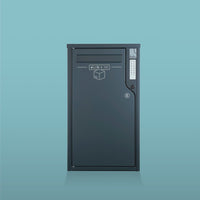


The couriers played along from day one
« Adopted straight away by every carrier. Receiving bulky parcels without being home is a real life-changer. Sturdy, simple to set up, simple to use. »
Yoann R.


The connected, secure mailbox and parcel box with dual access that lets you receive and return all your parcels and letters, even when you're not available.
Works without a subscription, right from installation.
Compatible with all carriers and all users, for secure, trackable and simple deliveries every day.

One-time or permanent codes

Open without a code

Control via Bluetooth

High security
The smallest Boks in the range (size S) is 10 times larger than a traditional letterbox: it receives over 98% of e-commerce parcels. And thanks to a letter slot and a retrieval net, it also handles your mail. Want to ship a parcel? Leave a code for the courier so they can collect it. Returning a purchase? Boks supports Colissimo letterbox returns. You really can do it all!
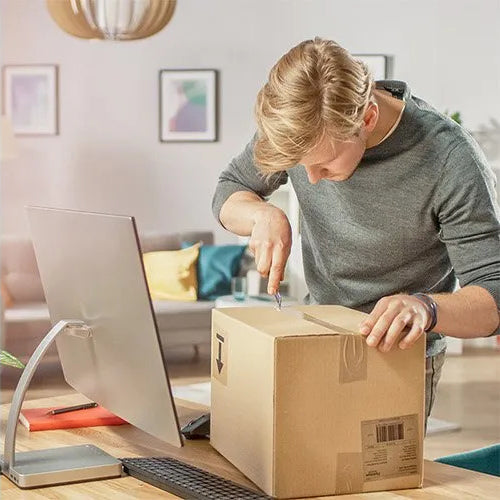
Are you a professional? Free yourself from delivery and shipping constraints; receive and send your parcels at any time, whether you're there or not.
Do you live in a house? Receive your parcels as easily as your mail, and stop spending your days waiting for the carrier.
With its optional rear door, recess your Boks into a fence, a boundary wall or a garage door. You can then access the box's contents without having to leave your home. Practical and useful, especially for fully integrated projects.




Electromechanical rotary-hook strike
resistant to 300 kg of traction
Reinforced steel sheet, 1 mm thick
stainless or galvanised with epoxy coating + internal hinges
Openings logged via single-use codes
with tokens generated by an asynchronous algorithm


Connected
Access management
Single-use or permanent depending on the need: you choose.
Contactless opening
or from a distance thanks to the Boks LINK WiFi bridge.
Parcel tracking
and receive your notifications thanks to the built-in parcel tracking.
User management
grant or revoke specific roles or rights.
En images


easy to integrate


Are you a company managing critical logistics flows or click-and-collect operations? Simplify your operations by automating the reception or shipping of all types of goods, from the smallest to pallets.

Are you a developer, operator, landlord, property manager or co-owner? With Boks HUB, equip your building with a shared, secure and compact parcel room, with no building work and at an ultra-competitive price.
Help
Very simply and in 3 steps:
1. I give my carrier an opening code (I can also enable postal badge opening from my Boks app to skip this step)
2. My carrier opens my Boks and drops off my parcel
3. Once notified of my delivery, I open my Boks via Bluetooth (or using a BoksTAG badge) to collect my parcel!
Yes! That's actually the very purpose of Boks products: to remain accessible to 100% of carriers.
Since you choose who you want to give an opening code to, you control the access rights. Boks technology is inherently compatible with any type of carrier and therefore any merchant.
They have 3 options to open my Boks and drop off my parcel:
1. I've set a permanent opening code in my delivery address (available and editable in the Boks app)
2. I give a single-use opening code directly to the carrier by phone at the time of delivery (which I generate on the fly from the Boks app)
3. The carrier is a postal operator and opens it with their electronic building-access badge (provided I've authorised this type of opening from the Boks app)
Neither one nor the other.
Your Boks is powered by 8 AAA batteries (like TV remote batteries) that give it 2 to 3 years of autonomy. It needs no WiFi or other internet connection since it communicates regularly via Bluetooth with your smartphone, and uses it to update its usage data and sets of opening codes.
NB: The BoksLINK WiFi bridge (available as an option) does, however, let you connect your Boks to the internet permanently, so you can be notified of your deliveries in real time and open remotely from your app to anyone wishing to drop off a parcel or an item.
Do you have a shipping label provided by your online retailer?
Log in to the Boks mobile app and go to the “Parcel return” tab. Copy your return label number to automatically schedule a collection by your postal carrier. Once validated, you receive directly via the Boks mobile app the date and time of your parcel's collection. All you have to do is place it in your Boks parcel box.
Would you like to send a parcel?
Log in to the chosen carrier's website and schedule a parcel dispatch from a mailbox. In the “Collection address” field, enter a carrier code (generated from the Boks app). Then place your parcel in your parcel box on the date indicated by the carrier.
Faults are extremely rare on Boks products.
However, should a problem arise, a hotline is available as well as a chat and the website's contact page: an advisor will reply to you the same day.
Please note that all parts are available and very easily replaceable in case of a problem.